AI Auto-Detection
Smart Tracking · One-Click Desensitize
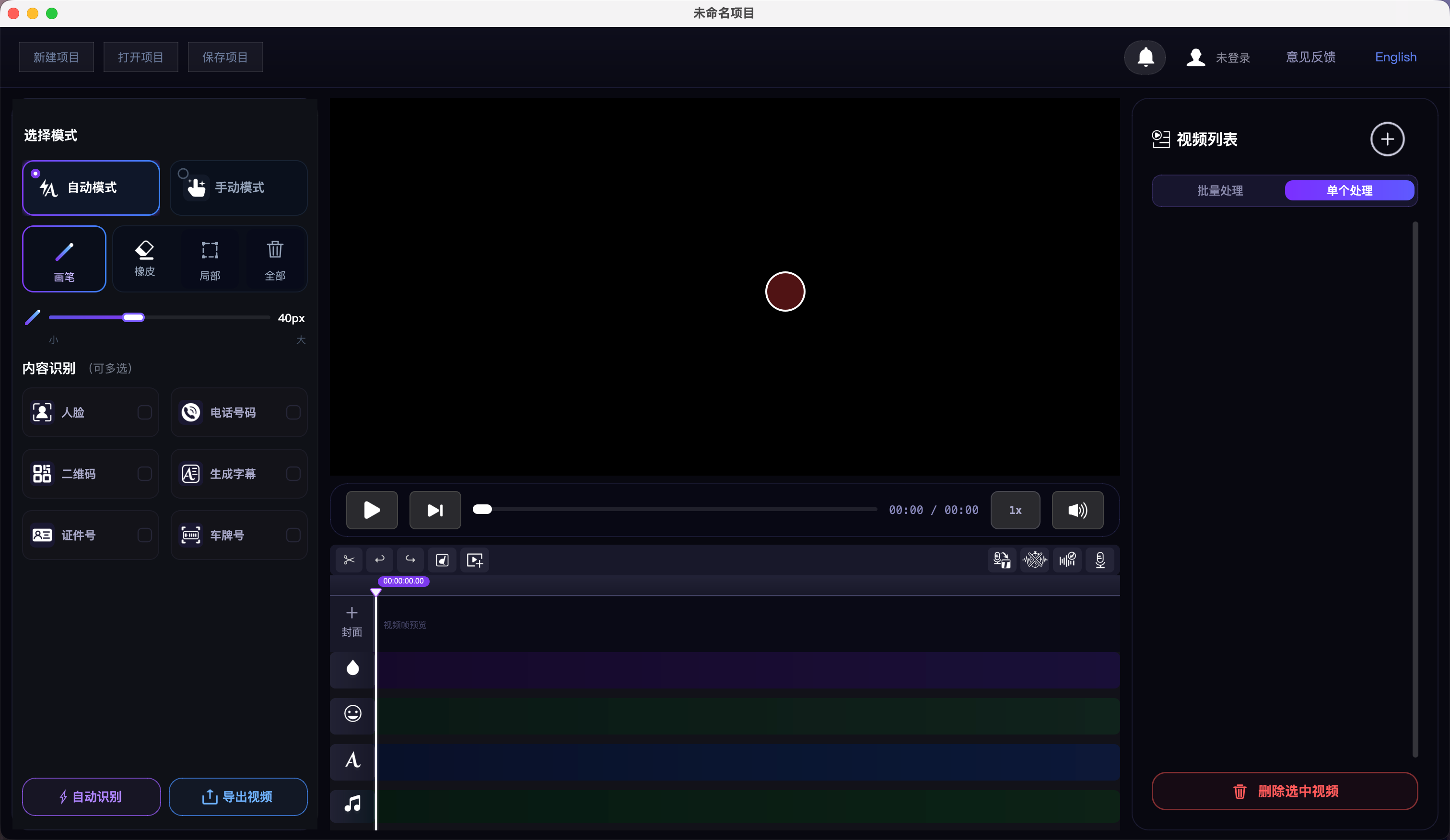
Faces, phones, QR codes, ID numbers — five-dimension local AI detection, masks track frame-by-frame;
18 blur effects including AI smart repair, batch H.264 near-lossless export — data never leaves your device.

Import · Mark · Export — Three Steps
Mark sensitive regions manually or with Auto mode, AI detects and tracks masks, batch export in one click — all local.
Import Video
Click Add Video or drag files in for batch import. MP4, MOV, AVI, MKV and more.
Mark Regions
Brush, rectangle or circle tools — or Auto mode for AI face, phone number, QR and ID detection with frame tracking and erase fine-tuning.
Batch Export
Click Start Processing — all videos process sequentially to the source directory, H.264 CRF 17 near-lossless, with a _no_sub filename suffix.
Pro Pipeline from Detection to Export
18 blur effects, 5-dimension AI detection, smart tracking, 16 subtitle presets, speech-to-text and sensitive-word muting — a complete local video privacy workstation.
18 Blur Effects · AI Smart Repair
AI smart repair, content-aware fill, mosaic, Gaussian, mean blur and more; strength 0–100. Right-click the blur track to batch-set effects or clear all blur. For motion, enable Settings → High-quality repair (temporal).
5-Dimension AI Auto-Detect
Face, phone (130+ formats), QR, ID, speech subtitles — select types, one-click detect (cancellable). Batch scan current or all videos; desensitization report pops up with CSV export.
Mask Drawing · Fine Editing
Brush, rectangle, circle, eraser and Auto mode; click empty timeline to create clips, playhead-centered scroll, edge snap to playhead; clear region on selected blur layer.
CSRT / KCF Smart Tracking
Right-click a clip to enable tracking: CSRT for precision, KCF for speed. Masks and stickers follow targets; re-track when the tracked range changes.
16 Subtitle Style Presets
Film, short video, news, gaming and more — stroke gradients, glow, shadow, backgrounds and in/out animations. Right-click a subtitle segment to style; apply to all subtitles.
Speech-to-Text · Word Filter
Local AI transcription with timestamps, double-click to edit. Optional sensitive-word filter and beep + mute at exact moments. Models download once, then fully offline.
Recording · Built-in Teleprompter
Record voice-over with gain 0–200%; built-in teleprompter with font/speed, txt/md import, mirror and fullscreen. Import audio with independent volume and preview play.
One-Click Word Muting
Settings → Sensitive words: app-wide library with txt/csv import/export. One-click locate spoken sensitive words and beep + mute precisely — all local.
Stickers & Text Overlay
Built-in emoji or import PNG/JPG/GIF/SVG with scale/rotate; GIFs sync frame-by-frame on export. System fonts, double-click to edit; text always renders above blur layers.
Batch Export · Presets
Batch or single export. H.264/H.265 up to 8K, GPU/CPU auto-scheduling; codec, quality, resolution, frame-rate cap and bitrate (incl. ABR) presets persist.
Dynamic Stylization · Projects
Per-video randomized blur, crop, color, speed and shake — fixed seed for reproducibility. .moying saves full edit state; Logs (top-right) filters local actions and errors.
Local AI · Data On Device
All models run locally — audio and video never leave the device. Speech model (~250 MB) downloads once, then offline; low RAM triggers automatic CPU fallback.
Local AI Pipeline · Detect to Export
Not a cloud API — complete local pipeline: 5-dimension detection, cross-frame tracking, blur desensitization, subtitles and batch export with CSV desensitization reports.
Import
Batch · multi-format
AI Detect
5-dim · cancellable
Track · Edit
Mask · sub · audio
Batch Export
H.264 near-lossless
5-Dimension Parallel
Models run in parallel — one failure won't block the batch; desensitization summary report + CSV export after each run.
Cross-Frame Tracking
CSRT/KCF dual-engine — masks and stickers follow targets stably; re-lock when range changes.
18 Blur Effects
From AI smart repair to motion blur — batch manage blur tracks, unified strength and type.
Fully Offline
Models cache locally after first download — zero upload throughout detection and export.
Every Scene That Needs Desensitization
AI auto-detection, smart tracking, one-click desensitization — from street interviews to enterprise recordings, trusted local AI for every industry.
Content Creation
Street interviews and vlogs — AI auto-detects faces and phones, masks track targets, one-click desensitize before publish.
Corporate Training
Auto-detect and mask CRM/ERP screens and client data in recordings — local desensitization, data stays on network.
Education
Batch AI-detect student info and chat areas in classroom recordings, auto-track and mask — safeguard minor privacy.
News & Media
AI batch-detects bystander faces, smart tracking desensitizes motion targets — done before broadcast deadline.
Local AI vs Cloud Blur Tools
Most online blur tools upload your video to a server. Videofuse detects and desensitizes on your device — the privacy difference is clear.
| Comparison | Videofuse (Local AI) | Cloud blur tools |
|---|---|---|
| Upload video to server | No — fully local | Yes — cloud upload |
| Works offline | Yes (after model download) | Requires network |
| Privacy & compliance risk | Lowest — data stays on device | Depends on third-party policy |
| How to get started | Free download | Often capped or watermarked |
| Pro batch workflow | Batch import/export · timeline | Mostly single-clip / light edit |
| Detection coverage | Face / phone / QR / ID / subtitles | Varies by product |
Comparison reflects product positioning; check each product’s current version for details.
See AI detect & blur — no download required
Pick a sample frame and watch local-style AI detection and masking. Real video processing happens only after you install the app; this site never uploads your files.

Demo uses preset sample images. Download the app for full 5-D detection and batch export.
Before / After · See for Yourself
Drag the slider to witness desensitization before and after — on the third tab, compare audio-only footage with cinematic subtitle transcription.


Detection Accuracy
Blur Effects
Privacy Protection
Local AI Processing — Confirm Your Hardware
AI models run locally. Apple Silicon (M1/M2/M3/M4) excels at content-aware repair and speech-to-text; Windows with a discrete GPU delivers significant speed gains. Low RAM triggers automatic CPU fallback — slower speeds are normal.
macOS (Apple Silicon)
| Minimum | Recommended | |
|---|---|---|
| OS | macOS 12 Monterey | macOS 14 Sonoma+ |
| Chip | Apple M1 | M2 / M3 / M4 |
| RAM | 8 GB | 16 GB+ |
| Storage | 5 GB | 20 GB+ |
Windows
| Minimum | Recommended | |
|---|---|---|
| OS | Win 10 64-bit 1903+ | Windows 11 64-bit |
| CPU | i5 / Ryzen 5 quad-core | i7 / Ryzen 7 8-core+ |
| RAM | 16 GB | 32 GB+ |
| GPU (optional) | Not required | NVIDIA GTX 1060 / RTX |
| Storage | 5 GB | 20 GB+ |
Disk Space
Check free disk space before installing to avoid mid-process interruptions from insufficient cache.
Space required to install and run the app
Speech-to-text small model; downloaded once on first use, then offline
Reserve free space for video processing and export cache
AI Auto-Detection
Smart Tracking · One-Click Desensitize
Download Videofuse — all processing stays local; your data stays yours. Faces, phones, QR codes, IDs and subtitles — five-dimension detection and batch desensitization in one workflow.
Apple Silicon native
NVIDIA CUDA acceleration
macOS 12+ (Apple Silicon) / Windows 10+ · Local GPU/CPU acceleration